


This step-by-step guide is designed to walk you through the basic operations of the new Useall support system
You can access the support environment from the Useall website. Use the same login and password you were already using in the previous support system.
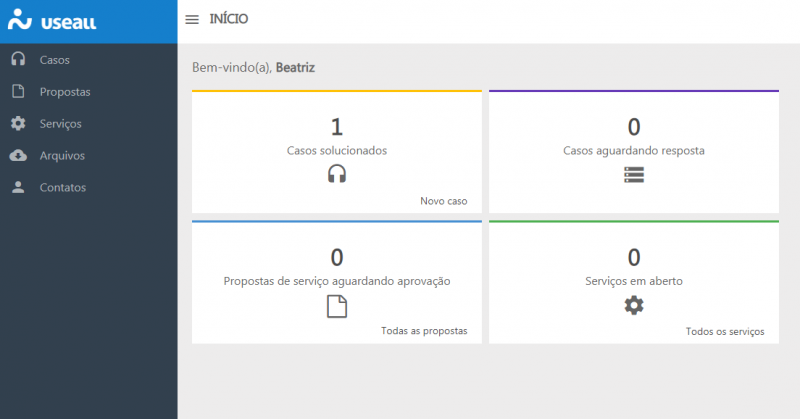
The system's home screen features a dashboard with management data so you can keep track of the cases opened by your company:
WHAT IS A CASE? WHAT IS THE DIFFERENCE BETWEEN A 'CASE' AND A 'TICKET'?
The "case" replaces the "ticket." A case is the entry point for telling us about any need your company has. Unlike a ticket, opening a new case is much simpler, consisting only of a written explanation describing your need. The ticket required filling in more classification fields to characterize your request.
HOW DO I OPEN A NEW CASE?
To open a new case, simply write a short text describing your need. The Useall team will take care of the analysis and classification to better route and filter your request. This way, the more analytical part of the process stays with the Useall team.
There are two ways to open a New case. One is through the home dashboard, as you can see below:
The other is through the Cases module in the left-hand column of the system:
HOW EXACTLY WILL MY CASE BE HANDLED?
Once you open a case, a Useall professional will be responsible for it from the start through to its full resolution. From an open case you can:
- Get answers to questions
- Request fixes for issues that have occurred
- Start a service process
- Start a Useall product evolution process (suggestions and improvements)
Your case will appear in a timeline where you can interact with the technician in charge. Within it, the technician can also count on the help of other Useall staff through internal invitations. This makes the interaction even more collaborative, so everyone involved can work together to resolve your request.
HOW DO I TRACK A CASE?
In the new Useall support environment, you can access your customer area and review the profiles of the cases you have opened — both those already closed and those still in progress.
By clicking on a profile, you open that case's timeline, where you can follow its progress chronologically through the conversations — replying to comments, attaching files, and asking questions in a more interactive and traceable way.
In this new model, you can access any case and reopen it simply by commenting on its timeline. Every action you take within the case profile sends a notification to the technician in charge, keeping your status up to date at all times.
WHAT ABOUT SUGGESTIONS FOR IMPROVEMENTS AND ADJUSTMENTS TO USEALL SYSTEMS?
Improvements to Useall software will also originate from cases and customer needs. The technical assessment will be provided within the case itself more quickly, along with matters such as timelines and releases.
HOW WILL SERVICE REQUESTS WORK IN THIS NEW SUPPORT MODEL?
Services will always originate from a case opened by you, our customer. We do it this way so that, over the course of a case, we can use every possible resource to solve a problem, opening a service only when it is truly needed.
This way, the customer takes part in the entire case resolution and follow-up process, and is also aware of the need for the service from its origin, participating in the decisions along the way.
WHAT ABOUT TICKETS FROM THE OLD SYSTEM THAT ARE STILL MARKED AS 'OPEN'?
Don't worry! All requests you made in previous tickets that are still in Open status will be migrated to the new system so you continue to receive follow-up.
IN PURSUIT OF BETTER RESULTS FOR YOU!
Your relationship with Useall professionals will become even closer and more accessible, and that translates directly into faster resolution of your requests and service arrangements.
Soon, we will publish more guides about the new tool here.
If you still have questions about Cases, contact our team by phone at (48) 3411-0600.
Leave a comment here about the new Useall support system.
Originally published in Portuguese at useall.com.br.