


Companies that want to improve financial control and the performance of their purchasing department need to use a purchasing process flowchart. Here's how!
A flowchart is a visual tool that expands our understanding of a given process. With it, we can map stages, identify operational bottlenecks, and even develop specific strategies to solve problems.
In the purchasing department specifically, a flowchart can be used to standardize purchasing steps and guide teams through their daily tasks.
If your goal is to start 2025 on the right foot, know that a flowchart is the right tool to improve your financial control and, of course, your purchasing process.
What are the stages of the purchasing process?
Whenever we talk about the purchasing process, we need to understand that the entire operation is divided into chains — that is, stages.
The first of them, for example, is identifying the company's current needs. The team needs to assess which demands are priorities, because that is what will allow them to align the budget and avoid all unnecessary purchases.
Second, you will need to select suppliers. In the corporate environment, there are many business partners working with the same category of product or service, and choosing the right professionals or companies to buy from can directly affect final product quality, delivery times, and cost-effectiveness.
Third, we have the purchase requisition. This document formalizes the request and details the specifications of the items to be purchased. It is usually sent to the responsible department or directly to the supplier.
After the requisition has been sent, a purchase order will also need to be generated. In this specific document, we include information such as product descriptions, quantities, negotiated prices, deadlines, and payment terms.
Next, we have the invoice and order stage. The invoice is the document that states the agreed amounts, while the order formalizes everything that will be delivered, detailing items, quantities, and dates.
And finally we have the payment stage, an operation that consists of settling the amounts agreed with the supplier and closing the negotiation, including keeping the accounting record of the transaction and issuing receipts.
Why use a purchasing process flowchart
As we saw earlier, the purchasing process is represented by a series of stages. A lack of organization across that chain can turn the entire financial operation into a real mess, bringing serious risks to the company, such as missing payment deadlines or even compromising the budget.
As a visual tool capable of bringing more clarity to business operations, the flowchart helps us identify problems that may be affecting the purchasing process and propose improvements quickly. In other words, it truly prevents critical information from getting lost or steps from being executed incorrectly.
What should you do before starting a purchasing process flowchart?
Alright, you've decided you want to start a purchasing process flowchart. What needs to be done next?

What does the current flow look like?
Identify every stage of your purchasing process, from needs assessment to the final payment of invoices. Also talk to the people responsible for each part of the process and gather data on execution times, tools used, and bottlenecks that are already known.
If possible, also describe the inputs and outputs of each stage, who is responsible, and how the processes connect.

Where are the bottlenecks?
Analyze the main problems that are holding back your current process. Point out which stages take longer than they should, and find out whether there is a lack of communication between departments or whether the team is making frequent mistakes in specific tasks.
Oh, and don't forget to also rank the bottlenecks in terms of impact and priority. Some problems can be solved quickly, but others may be more complex and require structural changes.

Who is responsible?
Talk to the teams to make sure all responsibilities are well defined and aligned with the skills and technical roles of each person or department. Also remember to record these owners in the flowchart, preferably using labels or colors to highlight each one's tasks.
What are our deadlines?
Nobody likes chasing unrealistic goals and unattainable deadlines, right? So analyze how long each stage takes in your current purchasing process flow and assess where there is room to shorten or optimize that time.
Don't forget to factor in external variables too, okay? Supplier response times and payment terms will directly influence your own deadlines.

Which tools can help us?
Take advantage of the fact that the modern world offers different types of tools, and choose the ones that help your company integrate information across the people and departments involved in the purchasing process.
But pay attention here! When choosing a solution, check whether the tool has features that make sense for your purchasing department, such as order tracking, inventory control, and supplier integration.
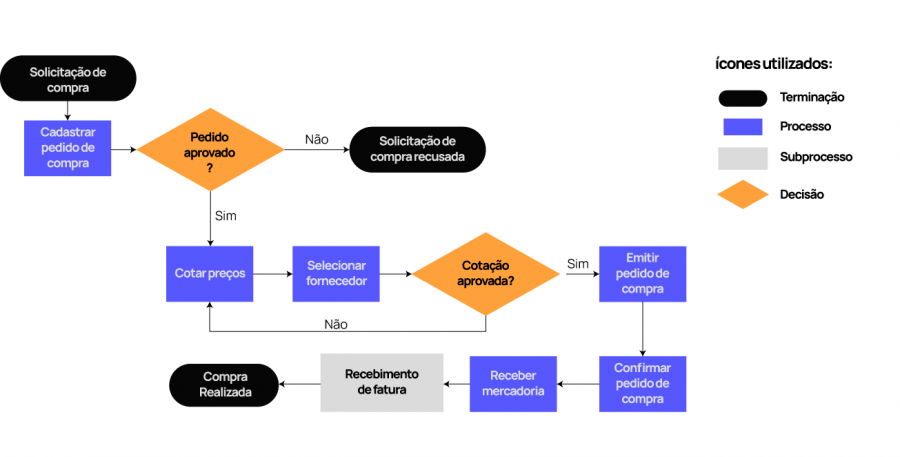
Flowchart example
How an ERP can optimize your purchasing process
An ERP is a management system that centralizes all business information and automates tasks. With it, we can access different features and capabilities, as well as generate informative reports that show exactly the current situation of our business or a specific department.
What many people don't know, however, is that we can also use the ERP to track the entire purchasing negotiation, from identifying the need — with integration to inventory and materials — through to receiving. That's because the technology connects all the data in real time.
In some tools, such as the Useall ERP, it is also possible to compare quotes and different suppliers in an intuitive portal, developed by experts to speed up decisions related to purchasing, management, or sales processes.
Want to optimize your company's purchasing management? Don't waste time — get to know the Useall ERP!

Originally published in Portuguese at useall.com.br.